so it’s been almost ten days since first version of Akonadi Google Resource and now here comes 0.2. This version
introduces Google Calendar Resource, so that you can finally access Google Calendar from comfortable interface of
KOrganizer.
UPDATE: Akonadi Google Resource is now in
KDE git repository!
As of now the resource supports read-only access to calendars, so you can just watch your busy schedule, but you still
have to update it in GMail. Some basic write support is the main goal for version 0.3.
A good news is, that the resource supports multiple calendars, so you can finally see all your calendars in KOrganizer,
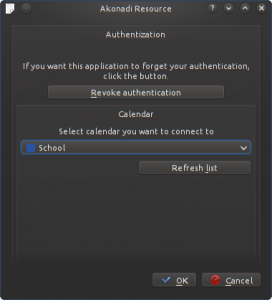
not just the default one. You have to add a new resource for each calendar you want to access. In configuration dialog
you can then choose, which calendar you want to sync with.
The resource supports, except for the basic properties, multiple attendees, including their roles and types, recurrent
events (but without exceptions) and reminders (popup-dialog and email notification).
As I already said, in 0.3 I’d like to introduce read-write access to Google Calendar and add photo-fetching to the
Contacts resource.
If you want to give it a try, you can download 0.2 tarball fromhere, or you get the most recent sources from git:
My job as a Red Hat internet is development of Evolution, the groupware software. Although I’m using Gnome 3 and all the
Gtk stuff in work, I’m still loyal to KDE on my personal laptop. But one thing I really like on Evolution and I really
miss in KDE PIM is proper support for Google services. As result of this and after some talking with my flatmate, I
started to work on real, fullfeatured Akonadi Resource for Google Services.
At this moment, after about week of work I have working Contacts Resource. It can fetch, create, update and remove
contacts from Google server using their GData API. The implementation of GData protocol is far from complete, as of now
only few basic values are supported (name, emails, phones, addresses, notes).
Since this implementation is actually “working”, I’ve decided to release it as 0.1.
Version 0.2 should bring basic support for Google Calendar and most probably some major refactoring of libkgoogle.
Following releases will focus on improving support of GData protocol, including fetching of contacts photos. I have to
mention here, that the code is inspired by code of the great Akonadi Facebook
Resource, because this is my first
Akonadi-related code and I really need something to learn from :)
There are no screenshots worth posting at this moment, you rather try checking out the sources, maybe sending some
patches back, what do you say? ;) Sources are available in Gitorious:
http://www.gitorious.org/akonadi-google, clone URL is
git://gitorious.org/akonadi-google/akonadi-google.git.
Based on KDE 4.6 beta 1 release last week, I decidedI to test
the latest KDE snapshot 4.5.82 and here are the news I’ve found in there :) I haven’t been using development snapshots
I’m creating every week for ArchLinux regularily last few weeks,
since I’m mostly on Fedora now, so the changes are now more obvious for me.
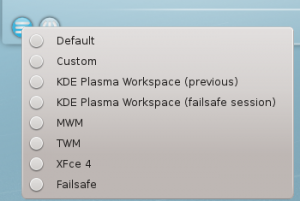
First interesting thing I noticed already in KDM. In the list of available desktop environments, there’s no longer any
“KDE”, but it’s KDE Plasma Workspace!
The first thing after login I was going to test was the new, aesome and almighty Akonadi. Well - it’s cool, I really
like that. On the other hand, I think it’s quite slow on my 2x1.5GHz laptop. Loading 6k mails takes considerable amount
of time after the KMail starts. I hope this will get fixed soon or later (most probably later :).
Next think I checked was KAdressBook. I hoped there will be an Akonadi Resource for something like sync with GMail
contacts and calendar, but I haven’t find anything, so I will probably have to write something myself :)
Unfortunatelly, Akregator does not store feeds and their content in Akonadi database, which was something I hoped for
since I first heard about KDE PIM2 migrating to Akonadi. It’s not a great feature, not definetelly usefull for any
resource integrations (you really don’t need to access your feeds from other apps, unless you are writing something
better then Akregator), but I’d like to see all the PIM stuff stored in one DB, which would really simplify backups and
improve portability (when you are migrating between more PCs, possibility to simply take with you just one DB file would
be a nice feature).
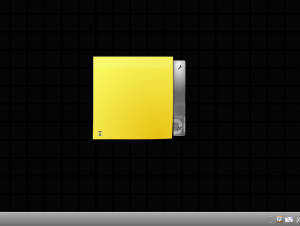
A really great feature, a very appreciated one is the “Grid desktop” (Desktop Settings -> View -> Layout -> Grid
Desktop). When you are dragging an applet on you desktop, a grid is displayed allowing you to position the applet and
after you drop it, the applet is automatically aligned to grid.
When you move mouse to a screenedge, a bar with + and - buttons appears allowing you to change the density of the grid.
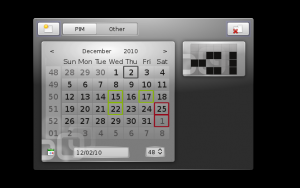
The new grid functionallity is further extended by applets groups. You can create widget which contains tabs. In each
tab there is a grid and you can put multiple applets into the grid. Another cool feature, don’t you think? I wish there
were more usefull applets like this, instead of something like KDE Observatory.
However I still found some issues with this applet, mostly when you try to insert a widget which is bigger then the
Group widget, it somehow overflows.
When we are talking about Plasma, I must mention Activities. It’s a very cool feature, but it’s not used a lot. Probably
because they still were unperfect, I personally for example really minded that the activities were all named like
Activity #1, Activity #2…now finally you can finally name your activities as you wish and they are more stable.
KDE 4.6 is also a great step toward HAL-less KDE. The PowerDevil has UPower backend now, but it’s not yet enabled by
default, HAL is still preferred, because it provides more features, but it’s possible to already use it for watching
battery/AC state and scaling CPU, but some features are slower then with HAL. UDisk was also implemented in 4.5.73
bringing support for mounting devices without HAL.
KDE 4.6 will be another great release in the KDE4 series, I’m happy to see KDE still evolving and moving towards modern
and fast desktop environment.
Czech version (not exact translation) can be found on my blog
on ABCLinuxu.cz.